MailerLite has spent years building a reputation as one of the most beginner-friendly, affordably priced email marketing platforms on the market. But with recent price changes, a shrinking free plan, and a crowded field of competitors, is it still worth choosing in 2026? This review breaks down exactly what you get, what’s changed recently, and who it’s actually the right fit for.
Quick verdict
MailerLite is best for solo creators, bloggers, and small businesses that want a clean, easy-to-learn platform for newsletters, basic automation, and landing pages — without paying enterprise prices. It’s not the right choice if you need deep CRM functionality, advanced conditional automation, or extensive third-party integrations; platforms like ActiveCampaign or Klaviyo handle that complexity better, at a higher cost.
What is MailerLite?
Founded in Vilnius, Lithuania, MailerLite has grown into a platform used by over a million businesses and creators worldwide. Beyond email campaigns, it bundles in a website and landing page builder, signup forms, automation workflows, and monetization tools (paid newsletters, digital product sales) — all under one login, rather than requiring separate tools stitched together.

Pricing overview
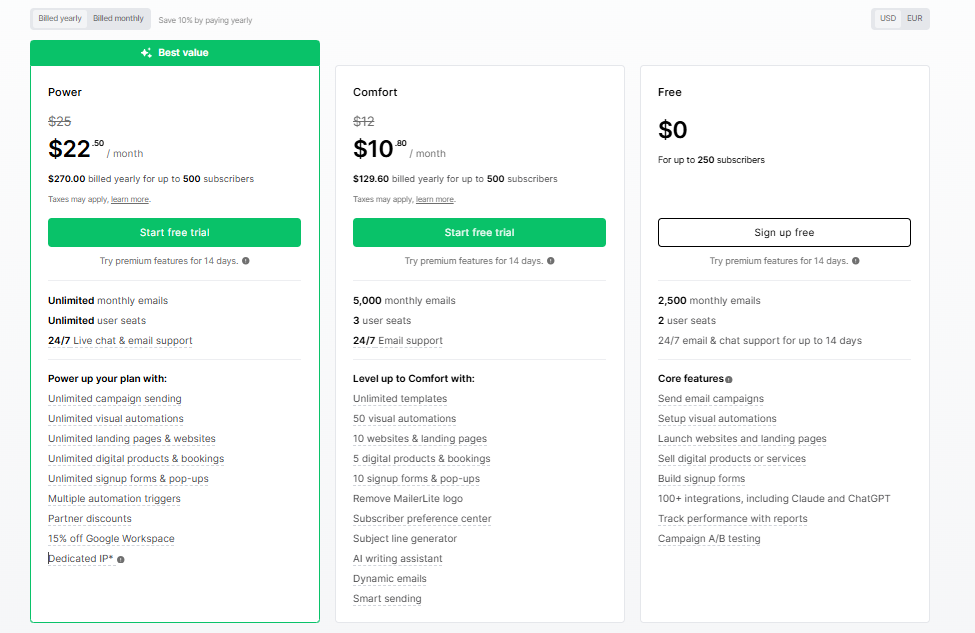
MailerLite runs four plans: Free, Comfort (from $12/month), Power (from $25/month), and custom Enterprise pricing for lists over 200,000 subscribers. The free plan covers up to 250 subscribers and 2,500 emails a month — generous compared to many competitors, though it’s been trimmed down twice in the past year (previously 1,000, then 500, now 250 subscribers). Paid plans scale with your subscriber count and include unlimited emails once you hit the Power tier.
For the full breakdown of what’s included at each tier, see our complete MailerLite pricing guide.
Features: what you actually get
Email editor. MailerLite offers three ways to build campaigns: a drag-and-drop visual editor, a simple text-first editor, and a custom HTML editor for full code control. The drag-and-drop builder is genuinely one of its strongest features — content blocks are well-organized, and you can add extras like countdown timers, surveys, embedded social posts, and dynamic content blocks that show different content to different segments within the same email. Where it falls short: spacing and layout control are fairly basic compared to more design-heavy platforms, so pixel-perfect brand consistency sometimes means switching to the HTML editor.
Automation. The visual workflow builder covers the essentials well — triggers based on form signups, group membership, link clicks, dates, and e-commerce activity, with steps for delays, conditions, and actions like sending an email or updating a subscriber’s group. It’s intuitive for non-technical users and handles welcome sequences, drip campaigns, and abandoned cart flows comfortably. It’s less capable than platforms built specifically around automation depth, like ActiveCampaign, particularly around complex multi-condition branching.
Landing pages and websites. This is a standout. Free accounts can publish one landing page and one website at no cost — a genuinely useful inclusion, since dedicated landing page tools typically run $40–90/month on their own. The builder includes an AI page generator, A/B testing for pages, and native e-commerce blocks for selling directly from a page.
Segmentation. MailerLite splits subscriber organization into groups (manual, static lists) and segments (dynamic, rule-based lists that update automatically based on behavior, location, engagement, and more). Used together, they cover most small-to-midsize list management needs, though there’s no built-in CRM for tracking deeper customer relationship data.
Integrations. MailerLite connects natively with commerce platforms like Shopify, WooCommerce, and Wix, plus 100+ other tools. The library is smaller than what Mailchimp or ActiveCampaign offer, which matters more if your stack depends on niche or industry-specific tools.
Deliverability
Independent testing consistently ranks MailerLite’s inbox placement among the better performers in the category, with scores in the low-to-mid 90s across recent tests — though exact figures vary by testing organization and time period, so treat any single number as a snapshot rather than a guarantee. MailerLite maintains this partly through a stricter-than-average account approval and domain verification process, which some new users find slows down their first send but generally keeps spam activity off the platform’s shared sending infrastructure.
One thing worth flagging honestly: a number of recent user reviews describe accounts being suspended or flagged even when bounce, complaint, and unsubscribe rates were within MailerLite’s own published thresholds. It doesn’t appear to be the norm, but it’s frequent enough across independent reviews that it’s worth knowing before you migrate a large existing list over.
Pros
- Clean, genuinely easy-to-learn interface — MailerLite has won “Best for Ease of Use” awards multiple years running
- Strong value at the entry paid tier compared to Mailchimp and similar competitors
- Free landing page and website builder included, even on the free plan
- Solid deliverability performance backed by independent testing
- Responsive 24/7 support on paid plans (email and live chat)
- AI writing assistant for subject lines, copy, and full newsletter drafts
Cons
- The free plan has been reduced twice in the past year, now capping at 250 subscribers
- No advanced conditional automation or built-in CRM — you’ll outgrow it if your needs get complex
- No direct migration assistance from other platforms; MailerLite positions itself as self-serve
- Some users report a strict, occasionally frustrating account approval and domain verification process
- Editor design flexibility (custom fonts, precise spacing) has real limits
- Isolated but recurring reports of account suspensions despite compliant sending metrics
Who should use MailerLite
- Solo creators and bloggers who want an affordable way to run a newsletter, sell digital products, or build a simple mailing list without a steep learning curve
- Small businesses and startups that need newsletters, basic automation, and a landing page without hiring a developer
- Budget-conscious teams switching off Mailchimp who want similar core functionality at a noticeably lower price
Who should look elsewhere
- E-commerce brands with complex, high-volume needs — Klaviyo or Omnisend offer deeper commerce-specific automation
- Teams needing advanced CRM and sales-pipeline features — HubSpot or ActiveCampaign fit better
- Anyone needing a large, mature integrations ecosystem — Mailchimp’s 800+ app library still leads here
Final verdict
MailerLite earns its reputation as one of the easiest, most affordable ways to get a professional email marketing operation running. The shrinking free tier is a legitimate downside worth factoring in if you’re starting from zero, and the automation depth has a ceiling that growing e-commerce or B2B teams will eventually hit. But for the price, and for the specific job of sending clean newsletters, building a landing page, and running straightforward automations, it remains one of the strongest options in its category for 2026.
Ready to try it? MailerLite offers a free plan with no credit card required, plus a 14-day trial of premium features on signup — a reasonable way to test the editor and automation builder before committing to a paid tier.