
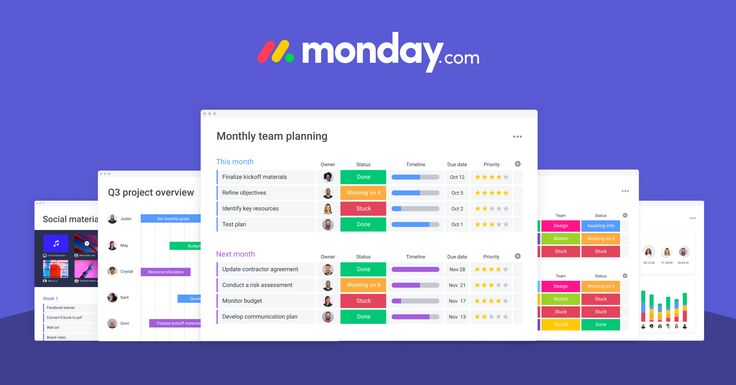
Monday.com has become one of the most heavily marketed project management platforms in recent years, with its colorful interface showing up in ads across YouTube, podcasts, and social media. That level of marketing spend comes at a cost, and much of it is reflected in the product’s pricing. This review examines whether Monday.com’s polish and flexibility genuinely justify its price tag, or whether you’re mostly paying for brand visibility.
What Is Monday.com?
Monday.com started life as “dapulse” in 2012 before rebranding in 2017. It’s built around what the company calls “Work OS” — a flexible framework of colorful, spreadsheet-like boards that can be configured to manage nearly any kind of work, from software development to sales pipelines to HR onboarding to event planning. Rather than being purpose-built for one type of workflow, Monday.com positions itself as infinitely customizable building blocks that any team can shape to their needs.
The visual identity is a big part of the appeal — bright colors, status labels, and progress bars make boards feel less like spreadsheets and more like living dashboards. This design-forward approach is part of why Monday.com has found particular traction with non-technical teams like sales, marketing, and HR, who might otherwise be intimidated by more utilitarian tools.
Core Features Worth Knowing
Boards and Items: The foundational unit is the “board,” structured similarly to a spreadsheet, with rows (called “items”) and columns representing different data types — status, people, date, numbers, text, and dozens of other column types.
Column Types: Monday.com supports an unusually wide variety of column types: status, timeline, dropdown, formula, dependency, location, rating, and more. This flexibility is a big part of why the platform can be adapted to so many different use cases, from tracking marketing campaigns to managing physical inventory.
Multiple Views: Like most modern platforms, Monday.com supports switching between Table, Kanban, Timeline (Gantt), Calendar, Chart, and Workload views for the same underlying data, without needing to re-enter information.
Automations: Monday.com’s automation recipes are genuinely one of its strongest features — simple if-this-then-that logic (e.g., “when status changes to Done, notify the assigned person and archive the item”) that can be set up without any coding knowledge. Even the mid-tier plans include a generous number of monthly automation actions.
Dashboards: Monday.com allows you to build custom dashboards pulling data from multiple boards, which is valuable for leadership needing a high-level view across several projects or departments without digging into individual boards.
Monday WorkForms: A built-in form builder that lets external or internal stakeholders submit requests directly into a board, useful for intake processes like creative requests, IT tickets, or event RSVPs.
Monday CRM, Dev, and Other Verticals: Beyond the core Work OS, Monday.com has built out specialized products — Monday Sales CRM, Monday Dev (aimed at software teams with sprint tracking), and Monday Service — each tailored with templates and features for specific use cases, though they typically require separate or upgraded subscriptions.
Where Monday.com Excels
Visual Appeal and Usability: Monday.com’s interface genuinely is more visually engaging than most competitors. Status columns with color coding make it easy to scan a board and immediately understand where things stand, which lowers the cognitive load for non-technical users.
Customization Without Code: The sheer number of column types and the flexibility to build custom workflows means Monday.com can be adapted to almost any department’s needs — sales pipelines, editorial calendars, product roadmaps, HR applicant tracking — all within the same underlying platform.
Automation Depth: For a no-code tool, Monday.com’s automation builder is impressively capable. Multi-step automations, conditional logic, and cross-board triggers are all achievable without needing a developer, which can save substantial administrative time once configured.
Strong Onboarding and Templates: Monday.com offers hundreds of templates across departments and use cases, plus a genuinely helpful onboarding wizard, which shortens the time from signup to productive use compared to more blank-slate competitors.
Cross-Departmental Consistency: Because so many different types of work can live inside the same platform, organizations can standardize on Monday.com across marketing, sales, operations, and even HR, reducing the number of disconnected tools employees need to learn.
Where Monday.com Falls Short — Especially on Price
Per-Seat Pricing Adds Up Fast. This is the crux of the “worth the price” question. Monday.com prices per seat, and unlike some competitors, it requires purchasing seats in blocks (often a minimum of 3 seats) rather than allowing granular single-user billing on paid tiers. For a growing team, this can mean paying for seats you’re not fully utilizing, and costs scale quickly once you move beyond the entry-level plans.
Feature-Gating Feels Aggressive: Several genuinely important features — like advanced automations, integrations beyond a certain volume, time tracking, and formula columns — are locked behind higher tiers. Teams often find that the plan they initially thought was sufficient doesn’t actually cover what they need, forcing an upgrade.
Complexity Can Sneak Up on You: While Monday.com markets itself as intuitive, the sheer number of configuration options can lead to boards becoming cluttered or inconsistent across a growing organization, especially without a dedicated admin managing structure and naming conventions.
Reporting Beyond Dashboards Requires Higher Tiers: More advanced reporting and analytics — the kind larger organizations need for real portfolio management — are gated behind Enterprise pricing, which can be a steep jump from the mid-tier plans.
Automation and Integration Action Limits: Even on paid plans, there are caps on the number of automation and integration actions per month. High-usage teams can hit these limits faster than expected, requiring an upgrade or careful management of automation usage.
Pricing Breakdown
Monday.com’s plans typically include:
- Free: Very limited — up to 2 seats, capped items, aimed more at individuals testing the platform than real teams.
- Basic: Unlimited items and boards, but limited automation/integration actions and no timeline or Gantt views.
- Standard: Adds Timeline/Gantt views, more automation and integration actions, and guest access — the most commonly chosen plan for small-to-mid teams.
- Pro: Adds formula columns, time tracking, private boards, and significantly higher automation/integration limits — necessary for teams with more complex workflows.
- Enterprise: Adds advanced security, governance, tailored onboarding, and enterprise-scale automation/integration limits.
Because plans are billed per seat with minimum seat blocks, actual monthly costs can be significantly higher than the advertised “starting at” price once you factor in your real team size.
Is It Actually Worth the Price?
The honest answer is: it depends heavily on how many different departments and use cases you can consolidate onto the platform. If your organization uses Monday.com purely as a task tracker for one small team, the per-seat cost is hard to justify compared to cheaper alternatives like Trello or Todoist. But if you’re using it to replace multiple disconnected spreadsheets and standalone tools across sales, marketing, operations, and HR — effectively becoming your organization’s central operating layer for work — the value proposition improves substantially, since you’re consolidating what might otherwise be several separate subscriptions.
The visual polish and ease of onboarding also carry real value for non-technical teams who might otherwise resist adopting project management software altogether. If ease of adoption is a genuine barrier for your team, Monday.com’s design-forward approach may justify the premium simply by increasing actual usage rates.
Who Should Use Monday.com
- Cross-departmental organizations looking to standardize project and process tracking across sales, marketing, ops, and HR on a single platform.
- Non-technical teams who need something visually intuitive and are willing to pay a premium for lower onboarding friction.
- Teams that rely heavily on automation to reduce manual administrative work, particularly around status updates and notifications.
- Companies already budgeting for a robust, all-in-one work management platform rather than trying to minimize software spend.
Who Should Consider Alternatives
- Small teams or startups on tight budgets may find better value in Trello, Todoist, or Asana’s free/starter tiers.
- Software development teams doing structured agile work will likely find Jira or Linear better suited to sprint-based workflows.
- Teams wary of per-seat pricing with minimums should carefully model out their actual costs before committing, since the “starting at” price rarely reflects real-world spend.
Final Verdict
Monday.com is a genuinely capable, visually polished, highly flexible platform — but it’s priced accordingly, and the per-seat, minimum-block billing model means costs can escalate faster than teams expect. It’s worth the price primarily for organizations that can spread its use across multiple departments and replace several other tools in the process. For a single small team with straightforward task-tracking needs, it’s likely more platform (and more cost) than necessary.
If you’re evaluating Monday.com, the key question isn’t “is this a good tool” — it clearly is — but “will we actually use enough of its breadth to justify what we’re paying?” Answer that honestly before committing to an annual contract.


