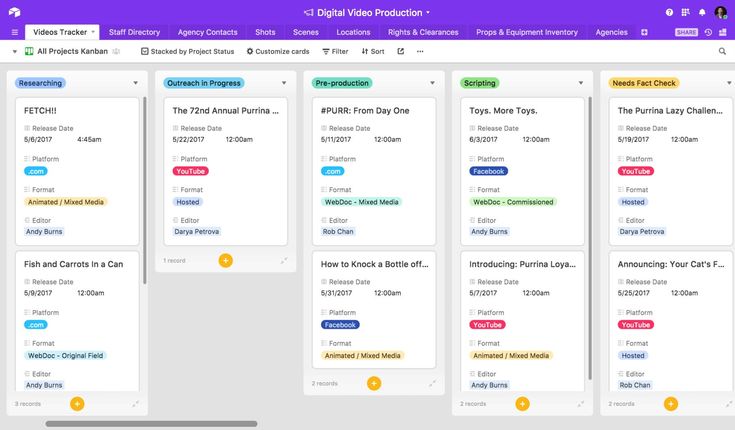
Airtable occupies a unique space between a spreadsheet and a full database, letting teams build everything from simple content calendars to genuinely relational CRM systems without writing a line of code. Its free plan is generous enough to be genuinely useful, but it comes with a specific, well-known limit that catches nearly every serious user eventually. This guide walks through exactly what Airtable’s free plan offers, what the Team plan unlocks, and how to know when the upgrade actually pays for itself.
What Airtable’s Free Plan Includes
Airtable’s free tier lets you build unlimited bases and tables within your record limits, and it includes Airtable’s Interface Designer for building simple custom internal apps on top of your data, a feature that used to be more restricted and is now included even at the free level. You get access to core views, grid, form, kanban, and calendar, basic automations with a monthly run cap, and the ability to invite an unlimited number of read-only viewers and commenters at no cost, since Airtable’s pricing model only charges for editors, people with permission to actually modify data in at least one base.
This read-only-is-free structure is genuinely valuable and worth understanding clearly, because it means a workspace with many stakeholders who only need to view dashboards or leave comments, without editing anything, can stay relatively cheap even as the number of people with some kind of access grows. Only editors count toward your bill on any Airtable plan, free or paid.
The free plan’s two hard limits are what most users eventually run into: a cap of 5 editors per workspace, and a limit of 1,000 records per base. Automations are also capped at roughly 100 runs per month on the free tier, enough for simple, occasional triggers but not for anything resembling continuous workflow automation.
The 1,000-Record Wall
The 1,000-record-per-base limit is, by a wide margin, the number one reason free users upgrade. Once a base hits its cap, it simply stops accepting new records; you cannot add more until you archive old data, split the base into multiple smaller bases, or upgrade to a paid plan. For a genuinely small, static dataset, a client contact list that never grows much beyond a few hundred entries, for example, this limit may never actually bite. But for any base tracking an ongoing, accumulating process, a sales pipeline, a content calendar with a full year of posts, a customer support log, or an inventory system, 1,000 records gets used up faster than most new users expect, often within the first several months of active use.
The 5-Editor Cap: A Newer and Increasingly Restrictive Limit
It is worth being specific about a change that has made Airtable’s free plan noticeably less generous over the past couple of years: free workspaces are now capped at 5 editors per workspace, alongside a separate cap on the number of commenters. This is relatively new; Airtable previously allowed unlimited free collaborators regardless of their permission level. Under the current structure, a team of six people who all genuinely need editing access must upgrade to a paid plan, no matter how few records they are actually working with. This means teams can now be forced off the free plan by headcount alone, independent of whether they have ever come close to the 1,000-record ceiling, which is a meaningfully different limiting structure than Airtable’s free plan used to have.
What Airtable Team Adds
The Team plan, Airtable’s first paid tier, is priced around $20 per editor per month billed annually (roughly $24 monthly on flexible billing), though some sources cite a slightly lower annual rate around $16 to $20 depending on current promotions and exact billing terms. It is worth noting that Airtable killed its older, cheaper “Plus” plan, which had been priced around $10 per seat, in 2023, rolling its features into Team at roughly double the price, so if you remember Airtable being cheaper a few years ago, that is why; there is no longer an intermediate tier between Free and the current Team pricing.
Team removes the 5-editor cap and the record limit entirely for practical purposes, raising the per-base record ceiling to 50,000, a fifty-fold increase over the free plan’s 1,000-record limit. Automation runs increase substantially as well, to roughly 25,000 runs per month, supporting genuinely continuous, multi-step automated workflows rather than just occasional simple triggers. Team also unlocks Airtable’s Gantt and timeline chart views, expanded attachment storage, and unlimited bases and workspaces.
Airtable AI is also included on the Team plan (and above), providing a monthly allocation of AI credits for features like automatically generating field summaries, tagging or categorizing records, running AI-powered automations that classify incoming data, and querying your database in plain English through an “Ask Airtable AI” style feature. AI credits are consumed per action, with simple actions using fewer credits than complex ones, and Airtable does not publish a fixed, universal credit-to-price conversion table, so actual usage limits are best checked directly within your own workspace dashboard.
What Airtable Business Adds
Business is the next tier up, priced significantly higher, commonly cited in the range of $45 to $54 per editor per month. This represents roughly a 125 percent increase in per-seat cost compared to Team, a steep jump worth being deliberate about. Business raises the per-base record limit further to 125,000, quadruples the monthly automation run allowance to roughly 100,000, and, notably, makes commenters free rather than billable, which flips the cost equation for organizations with a high ratio of commenters to actual editors. Business also adds stronger governance and administrative controls suited to larger organizations with compliance requirements.
What Airtable Enterprise Scale Adds
At the top of the lineup sits Enterprise Scale, priced with a custom quote rather than a published rate. This tier is aimed at large organizations needing the highest levels of security, governance, and support, along with the ability to negotiate pricing based on scale. Unless you are running a large company with formal compliance needs, Enterprise Scale is unlikely to be the right fit.
Hidden Costs Worth Budgeting For
Beyond the core per-seat pricing, Airtable has a few add-on costs worth knowing about before budgeting. Airtable Portals, which give external, non-team-member users access to specific data without making them full paid editors, start around $120 per month for a package covering 15 external users on the Team plan, a real cost if your workflow involves regular external client or contractor access to your bases. Extra AI credits, beyond what is included in your plan’s monthly allocation, are also priced separately, with packages commonly starting around $120 per month for an additional 10,000 credits. Integrating Airtable with external automation tools like Zapier or Make, common for teams wanting to connect Airtable to other software, typically adds another $200 to $300 per month on top of your base Airtable subscription, depending on your automation volume.
A Real-World Cost Example
To make the seat-based pricing concrete: a six-person team, all needing editing access, moving from Free to Team on annual billing works out to roughly 6 times $20, or about $120 per month, translating to $1,440 per year. Add a seventh person, perhaps a freelancer who occasionally needs to update deliverables directly in your base, and the cost climbs again, since the price of the tool tracks your organization’s actual headcount with editing needs, not how heavily any individual person actually uses the platform. This “per-editor, not per-usage” pricing structure is worth keeping in mind, since it means a team’s Airtable bill can grow simply from adding collaborators, independent of how much data or automation those collaborators actually need.
How Airtable Compares to Cheaper Alternatives
If Airtable’s record limits or per-seat pricing feel restrictive for your use case, it is worth knowing what comparable tools offer. Notion, for comparison, charges around $10 per user per month for its Plus plan and imposes no record limits on its database features at all, though Notion’s databases are generally simpler and less relationally powerful than Airtable’s linked records, lookups, and rollups. Coda’s Pro plan is similarly priced around $10 per user, offering powerful formulas and custom app-building capability with a steeper learning curve than Airtable but comparable flexibility once mastered.
The trade-off is genuine: Airtable’s relational database model, with true linked records between tables, lookups that pull data across relationships, and rollups that aggregate related data, remains widely considered the best-in-class way to teach a team what a proper database actually is without requiring anyone to write code. If your workflow genuinely depends on that relational structure, spreadsheets-turned-databases, CRMs, or inventory systems with real cross-table relationships, that capability may be worth the premium over cheaper, simpler alternatives. If your needs are closer to a well-organized set of lists or a basic tracker without complex relationships between different types of data, a cheaper tool like Notion or Coda may cover your needs at a meaningfully lower cost.
Who Should Stick With Airtable Free
Solo users, freelancers, and small teams of five or fewer editors testing whether Airtable fits their workflow, or managing a genuinely small, relatively static dataset that will not approach 1,000 records anytime soon, are well served by the free plan. It has no time limit, so there is no urgency to upgrade before you have a concrete reason to.
Who Should Upgrade to Team
The upgrade becomes necessary the moment either of the free plan’s two hard caps becomes a real obstacle: your team needs a sixth editor, or a base is approaching or has hit its 1,000-record limit. For most teams doing genuinely ongoing, accumulating work- sales pipelines, growing content libraries, active support logs, this tends to happen within the first several months of real use, making Team a fairly predictable eventual upgrade rather than a hypothetical one. Teams that also want to use Airtable AI features, Gantt-style timeline views, or need a meaningfully higher automation ceiling for continuous workflows will find those specifically gated behind Team as well.
Who Should Upgrade to Business
Larger organizations with datasets regularly exceeding 50,000 records per base, teams running high-volume automation beyond Team’s 25,000 monthly run allowance, or organizations with a high ratio of commenters to editors (since commenters become free on Business) should consider the jump. Given the roughly 125 percent per-seat price increase over Team, it is worth confirming your organization has actually hit these specific ceilings rather than upgrading preemptively.
The Bottom Line
Airtable’s free plan is generous enough to genuinely test and use the platform, but its two defining limits, 5 editors and 1,000 records per base, are both hard caps that most active teams eventually hit, often within a matter of months rather than years. The jump to Team, at roughly $20 per editor per month with no intermediate pricing tier available anymore since Airtable discontinued its cheaper Plus plan in 2023, is a real cost increase worth budgeting for from the start if you know your use case will scale. For teams whose genuine need is a true relational database rather than a simple list or tracker, that cost is often justified by capability that simpler, cheaper tools like Notion or Coda cannot fully replicate. For simpler needs, it is worth comparing directly against those alternatives before committing to Airtable’s pricing structure long-term.