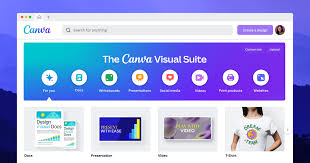
Canva has made design accessible to millions of people who never learned traditional design software, but as businesses and creators grow more sophisticated in their design needs, some start looking for alternatives that offer deeper customization, more professional-grade tools, or a different pricing structure. Whether you’re a growing brand that’s outgrown Canva’s templates or a designer seeking more creative control, there are several strong alternatives worth exploring. Here’s a look at the best options for more professional design work.
Adobe Express
Adobe Express (formerly Adobe Spark) offers a similar drag-and-drop simplicity to Canva but with the added advantage of integrating with Adobe’s broader Creative Cloud ecosystem, including access to Adobe Fonts, Adobe Stock imagery, and simplified versions of Photoshop-style editing tools. For businesses or individuals already using other Adobe products, this integration creates a smoother workflow between quick social graphics and more advanced design work in programs like Photoshop or Illustrator. Adobe Express strikes a solid middle ground between Canva’s simplicity and more professional design capability.
Figma
Figma has become the industry standard for UI/UX design and has increasingly been adopted for broader graphic design and prototyping work, thanks to its powerful vector editing tools, component systems, and real-time collaboration features. Unlike Canva’s template-driven approach, Figma gives designers granular control over every element, making it a favorite among professional designers and design teams who need precision and consistency across complex projects, like building a full brand design system rather than individual social posts. Its learning curve is steeper than Canva’s, but for teams doing serious design work, that added control is often exactly what’s needed.
Affinity Designer
Affinity Designer is a professional-grade vector design tool that offers Illustrator-level capability at a one-time purchase price rather than a subscription. It’s built for designers who need precise control over typography, vector illustrations, and complex layouts, going well beyond what Canva’s template system was designed to handle. While it has a steeper learning curve than Canva, it rewards that investment with far greater creative flexibility, making it a strong choice for freelance designers and agencies producing polished, custom brand assets.
Crello (now VistaCreate)
VistaCreate, formerly known as Crello, offers a Canva-like template-driven design experience with a strong focus on social media graphics, marketing materials, and video content. It’s a natural lateral alternative for users who like Canva’s ease of use but want to explore a different template library and pricing structure, sometimes finding VistaCreate’s premium content library or specific template styles better suited to their brand aesthetic.
Piktochart
Piktochart specializes in infographics, reports, and presentation-style visual content, offering more purpose-built tools for data visualization and structured informational design compared to Canva’s more general-purpose template library. For businesses or content creators who frequently need to turn data and information into visually compelling infographics or reports, Piktochart’s more specialized toolset often produces more polished, professional results than adapting a general Canva template for the same purpose.
Sketch
Sketch is a vector-based design tool historically popular for UI/UX and digital product design, particularly within the Mac-based design community. While it has faced increasing competition from Figma’s collaborative, browser-based approach, Sketch remains a capable, professional-grade design tool for creators who want precise control over interface and graphic design work beyond what Canva’s simplified toolset offers, particularly for designers already comfortable in a native Mac app environment.
Gravit Designer
Gravit Designer offers a free, browser-based vector design tool with capabilities that go well beyond Canva’s template-based system, including precise path editing, typography controls, and layer management similar to more established professional design tools. It’s a solid choice for designers who want more creative control than Canva provides but aren’t ready to invest in a paid professional tool like Adobe Illustrator or Affinity Designer.
Canva vs. These Alternatives: What Actually Changes
The core distinction between Canva and most of the alternatives listed here comes down to control versus convenience. Canva excels at getting a polished result quickly by leaning heavily on templates and pre-set design elements, which is fantastic for non-designers or anyone working under tight time constraints. Tools like Figma, Affinity Designer, and Sketch trade some of that speed and simplicity for significantly more creative control, precise typography, custom vector shapes, and design systems built from scratch rather than adapted from a template.
When to Consider Moving Beyond Canva
If your brand’s visual identity is starting to feel indistinguishable from countless other businesses using the same popular Canva templates, that’s often a signal it’s time to explore tools that allow more original, custom design work. Similarly, if you’re building complex design systems, detailed brand guidelines, or intricate vector illustrations that Canva’s editing tools simply can’t achieve, a more professional tool will likely serve your needs better, even with the added learning curve.
When Canva Still Makes Sense
It’s worth acknowledging that Canva remains an excellent tool for many use cases, especially quick social media graphics, presentations, and marketing materials where speed and ease of use matter more than pixel-perfect custom design. Many professional designers even use Canva alongside more advanced tools, reserving it for quick, low-stakes content while using something like Figma or Affinity Designer for core brand assets and more polished client work.
Pricing Considerations
Pricing varies considerably across these alternatives. Figma offers a genuinely useful free tier for individuals, with paid plans scaling based on team collaboration needs. Affinity Designer uses a one-time purchase model, appealing to those who want to avoid ongoing subscription costs. Adobe Express and VistaCreate generally follow a freemium subscription model similar to Canva’s own pricing structure. Piktochart and Gravit Designer also offer free tiers with paid upgrades unlocking more templates, assets, and export options. Comparing your budget and how frequently you’ll use the tool against each platform’s current pricing is worthwhile before committing.
Final Thoughts
Canva earned its massive popularity by making design accessible to nearly anyone, but professional design work often benefits from tools that offer deeper customization and creative control. Whether you choose Figma for collaborative, precision-based design work, Affinity Designer for professional vector illustration without a subscription, or a more specialized tool like Piktochart for data visualization, the right alternative depends on the specific gap you’re trying to fill beyond what Canva’s template system can offer. Many professionals ultimately use a combination of tools, Canva for speed, and something more advanced for the polished, original work that truly represents their brand at its best.