Few project management tools carry as strong a reputation — and as strong a stereotype — as Jira. Ask most people outside of software development what they think of it, and you’ll often hear some version of “isn’t that the developer tool with all the tickets?” That reputation isn’t unearned, but it’s also not the whole story. This review examines what Jira actually does well, whether its developer-centric image is deserved, and whether non-technical teams have any real reason to consider it.
What Is Jira?
Jira was created by Atlassian in 2002, originally as a bug and issue tracking tool for software teams. Over the years, it’s evolved into a much broader work management platform, but its DNA as a tool built by developers, for developers, remains deeply embedded in its terminology, workflows, and default structures. Even today, the core unit of work in Jira is called an “issue,” a term borrowed directly from software bug tracking, and the platform’s most celebrated features — sprints, backlogs, epics, and story points — are all concepts native to agile software development methodologies like Scrum and Kanban.
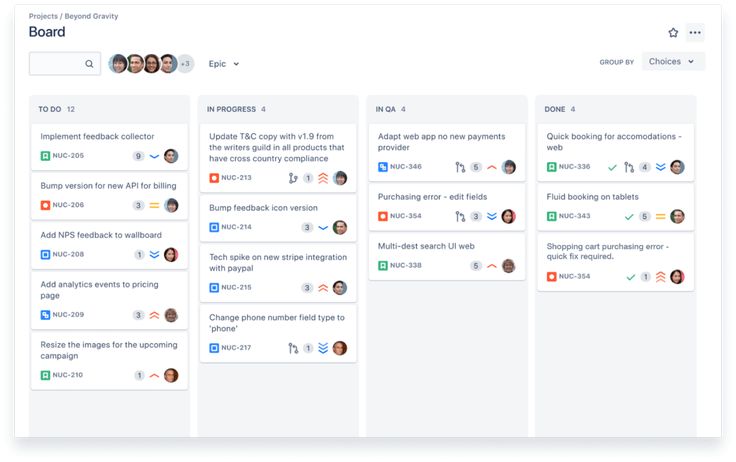
Atlassian has made real efforts to broaden Jira’s appeal, including launching “Jira Work Management” as a more general-purpose version aimed at non-technical teams, but the flagship “Jira Software” product remains firmly rooted in its developer-tool origins.
Core Features Worth Knowing
Issues: The fundamental unit of work in Jira, which can represent anything from a software bug to a user story to a task, depending on how your team configures issue types. Each issue can carry extensive metadata: priority, story points, sprint assignment, linked issues, and custom fields specific to your workflow.
Epics, Stories, and Sprints: Jira’s structure closely mirrors agile methodology: large initiatives are broken into Epics, which are broken into Stories or Tasks, which are then pulled into time-boxed Sprints (typically one to four weeks) for active development. This structure is genuinely well-suited to how many software teams actually plan and execute work.
Backlog Management: A dedicated Backlog view lets product managers and engineering leads prioritize upcoming work, estimate effort (often via story points or time estimates), and groom the backlog ahead of sprint planning sessions.
Boards: Jira supports both Scrum boards (tied to sprints) and Kanban boards (continuous flow, no sprint boundaries), letting different teams within the same organization use the methodology that fits their workflow.
Workflows Jira allows for highly customizable workflows, where you define the exact statuses an issue can move through (e.g., To Do → In Progress → Code Review → QA → Done) and the specific transition rules between them, including required fields or approvals at each stage.
Roadmaps: A visual, timeline-based view for planning epics and releases over longer time horizons, useful for communicating high-level product direction to stakeholders outside the immediate development team.
Integrations With Developer Tools Jira integrates deeply with tools like Bitbucket, GitHub, GitLab, and CI/CD pipelines, allowing code commits, pull requests, and deployments to be automatically linked to relevant issues — a level of developer-workflow integration that general-purpose PM tools simply don’t attempt to replicate.
Jira Work Management: Atlassian’s answer to the “is Jira only for developers” question — a version of Jira with simplified terminology (no epics or sprints by default) and templates aimed at marketing, HR, legal, and other non-technical teams, while still running on the same underlying Jira infrastructure.
Why Jira Remains the Standard for Software Teams
Purpose-Built Agile Support: No general-purpose PM tool matches Jira’s depth of native support for Scrum and Kanban methodologies. Sprint planning, velocity tracking, burndown charts, and backlog grooming are all first-class, well-refined features rather than approximations.
Deep Developer Tool Integration: The ability to automatically link commits and pull requests to issues, and to see deployment status directly within a ticket, genuinely streamlines the development workflow in ways that matter significantly for engineering teams.
Granular, Customizable Workflows: For engineering organizations with well-defined processes (code review requirements, QA gates, deployment approvals), Jira’s workflow customization lets you enforce that process at the tool level, rather than relying on informal team discipline.
Scalability for Large Engineering Organizations: Jira handles complex, multi-team engineering organizations well, with features like cross-team dependency tracking, portfolio-level roadmaps (via the Advanced Roadmaps add-on), and robust permission schemes for large, security-conscious companies.
Mature Reporting for Engineering Metrics: Built-in reports like velocity charts, burndown/burnup charts, and cumulative flow diagrams give engineering managers genuinely useful, agile-specific insights that general PM tools don’t typically offer natively.
Where Jira Struggles — Especially Outside Engineering
Terminology Is a Real Barrier: Terms like “epic,” “sprint,” “story points,” and “backlog” are second nature to software teams but genuinely confusing and off-putting to non-technical staff. Even with Jira Work Management’s simplified terminology, the underlying product still feels built for a different kind of user.
Interface Complexity: Jira has a reputation — not entirely undeserved — for being visually dense and administratively complex. Setting up custom workflows, issue types, and permission schemes often requires either a dedicated Jira administrator or significant time investment, which can be a real barrier for smaller or non-technical teams.
Overkill for Simple Task Tracking: If a team just needs a straightforward list of tasks with due dates, Jira’s structure (issues, workflows, sprints) introduces unnecessary overhead compared to something like Trello or Asana.
Non-Technical Teams Often Feel Alienated. Even with the Work Management product, employees who’ve heard colleagues in engineering complain about “Jira tickets” often approach the tool with preexisting skepticism, which can create adoption friction that’s more cultural than functional.
Cost Can Escalate With Add-Ons: Advanced features like portfolio-level roadmapping across multiple teams often require additional paid apps from the Atlassian Marketplace, which can add unexpected costs beyond the base subscription.
So, Is It Only for Developers?
The honest answer: not exclusively, but its center of gravity remains firmly technical. Jira Work Management genuinely does offer simplified templates for marketing campaigns, HR onboarding, and legal request tracking, and some non-technical teams — particularly those working closely alongside engineering, like product managers or technical writers — do find value in using the same tool their engineering counterparts already rely on, simply for the sake of consistency and easier cross-team visibility.
But for a marketing or HR team with no organizational reason to align with engineering’s tooling, Jira is rarely the first recommendation. Its interface, terminology, and default workflows are optimized for a different kind of work than most non-technical teams perform day to day, and tools like Asana or Monday.com generally offer a gentler, more purpose-built experience for those use cases.
Pricing Overview
Jira’s plans typically include:
- Free: Supports a limited number of users, with core Scrum/Kanban boards and basic reporting — usable for very small teams or side projects.
- Standard: Adds more storage, permission controls, and higher user limits, aimed at small-to-mid engineering teams.
- Premium: Adds Advanced Roadmaps (cross-team, multi-project planning), admin insights, and 24/7 support, generally necessary for larger engineering organizations.
- Enterprise: Adds unlimited instances, advanced security, and centralized administration for large, complex companies.
Jira Work Management is priced separately from Jira Software, so organizations wanting to use both flavors across different departments should budget for potentially separate subscriptions.
How Jira Compares
Compared to Asana, Jira offers far deeper native agile and developer-tool support but a steeper learning curve and less intuitive design for general work. Compared to Trello (also owned by Atlassian), Jira is dramatically more powerful for structured software development but nowhere near as approachable for simple task tracking. Compared to Linear (a newer, developer-focused competitor), Jira offers more customization and enterprise scalability, while Linear generally offers a faster, cleaner, more opinionated experience favored by smaller, speed-focused engineering teams.
Who Should Use Jira
- Software development teams practicing Scrum or Kanban who need mature, purpose-built agile tooling.
- Engineering organizations needing deep integration between issue tracking and code repositories/CI-CD pipelines.
- Large, complex organizations with multiple engineering teams needing cross-team roadmap visibility and robust permission structures.
- Product managers working closely alongside engineering who benefit from shared visibility into the same backlog and sprint structure.
Who Should Consider Alternatives
- Non-technical teams (marketing, HR, sales, operations) will generally find a more natural fit in Asana, Monday.com, or Trello.
- Small engineering teams wanting a faster, simpler experience might prefer Linear, which trades some of Jira’s customization for speed and design polish.
- Organizations without a dedicated Jira administrator may struggle with the setup and ongoing maintenance overhead required to keep Jira running smoothly.
Final Verdict
Jira isn’t literally “only for developers” — Atlassian has made genuine efforts to broaden its appeal — but its heart, terminology, and design philosophy remain deeply rooted in software development workflows, and that shows in nearly every corner of the product. For software teams practicing agile methodologies, Jira remains one of the most mature, capable tools available, with a level of developer-workflow integration that general-purpose competitors don’t attempt to match.
For everyone else, it’s worth approaching with realistic expectations: you can make Jira work for non-technical use cases, but you’re generally swimming against the current of a tool built for a different kind of team. If your organization’s primary reason for considering Jira is alignment with an existing engineering team’s tooling, it can make sense. Otherwise, most non-technical teams will find a smoother, more intuitive experience elsewhere.