Managing finances is one of the least glamorous but most critical parts of running a small business, and QuickBooks has been the dominant name in small business accounting software for decades. For many entrepreneurs, “doing the books” and “using QuickBooks” have become nearly synonymous. But is it still the right choice for small business owners in 2026, given the growing number of alternatives and QuickBooks’ own evolving pricing structure?
This review breaks down what QuickBooks offers, how it performs for real small business needs, and whether it deserves its continued dominance in the space.
What Is QuickBooks?
QuickBooks, developed by Intuit, is accounting software designed to help small and medium-sized businesses manage their finances — everything from invoicing and expense tracking to payroll and tax preparation. It’s available in several versions, with QuickBooks Online (cloud-based) now being the primary offering for most small businesses, alongside QuickBooks Desktop for those who prefer locally installed software.
QuickBooks aims to serve as a complete financial management hub, reducing the need for business owners to juggle spreadsheets, separate invoicing tools, and manual expense tracking across disconnected systems.
QuickBooks Online vs QuickBooks Desktop
QuickBooks Online has become the primary focus of Intuit’s development efforts, offering cloud accessibility, automatic updates, and easier collaboration with accountants and bookkeepers who can access your books remotely. QuickBooks Desktop remains available for businesses that prefer locally installed software, though Intuit has been gradually shifting focus and new feature development toward the Online version, and desktop licensing has moved toward a subscription model as well.
For most small businesses today, QuickBooks Online is the more practical choice, given its accessibility from any device and smoother collaboration features.
Core Features Breakdown
Invoicing
QuickBooks allows you to create and send professional, customizable invoices, track when they’ve been viewed by clients, and set up automatic payment reminders for overdue invoices. Recurring invoices can be automated for clients on retainer or subscription arrangements, saving significant administrative time for service-based businesses.
Expense Tracking
The platform connects directly to your bank accounts and credit cards, automatically importing and categorizing transactions. QuickBooks uses machine learning to suggest categories for recurring transactions, which becomes increasingly accurate over time as it learns your typical spending patterns, reducing the manual work of expense categorization.
Financial Reporting
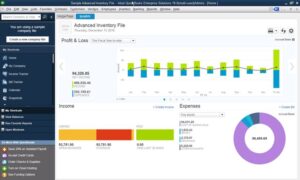
QuickBooks generates a wide range of financial reports, including profit and loss statements, balance sheets, and cash flow statements, which are essential not just for your own understanding of business health but for tax preparation, loan applications, and investor communications. Reports can be customized and scheduled for automatic generation, which is genuinely useful for business owners who want regular visibility into their financial position without manually pulling reports each time.
Payroll
QuickBooks Payroll (available as an add-on) handles employee payroll calculations, tax withholdings, and direct deposits, along with automatic filing of payroll taxes in many cases. For small businesses with employees, having payroll integrated directly with accounting data eliminates the need for separate reconciliation between payroll and bookkeeping systems.
Tax Preparation Support
QuickBooks organizes financial data in a way that significantly simplifies tax season, whether you’re preparing your own taxes or handing off organized books to an accountant. Some plans include direct integration with TurboTax, streamlining the process of transferring business financial data into your tax filing.
Inventory Management
For product-based businesses, QuickBooks offers inventory tracking features, including stock level monitoring, cost tracking, and reorder alerts. While not as robust as dedicated inventory management systems for businesses with complex supply chains, it’s sufficient for many small retail and product-based businesses.
Multi-User Access and Accountant Collaboration
QuickBooks Online allows multiple users to access the same set of books simultaneously, with permission controls to restrict access to sensitive information as needed. The ability to grant your accountant or bookkeeper direct access to your books — without needing to export and email files back and forth — is one of the platform’s most practically valuable features for small business owners who work with outside financial professionals.
Mobile App
The QuickBooks mobile app allows you to send invoices, track expenses, capture receipts by photographing them, and check your financial dashboard while away from your desk. For business owners constantly on the move, this mobile accessibility genuinely matters for staying on top of finances in real time.
Bank Reconciliation
QuickBooks streamlines the bank reconciliation process, automatically matching imported transactions against your recorded books and flagging discrepancies that need attention. This significantly reduces the tedious, error-prone process of manually reconciling accounts that many small business owners previously handled with spreadsheets.
User Experience
QuickBooks’ interface has improved considerably over the years, though it can still feel overwhelming for business owners with no accounting background. The platform does include guided setup tools and educational resources aimed at users without formal accounting training, but there remains a genuine learning curve to using the software effectively — particularly for understanding which reports matter and how to properly categorize different types of transactions.
Many small business owners find it worthwhile to work with a bookkeeper or accountant, at least initially, to ensure their QuickBooks setup is configured correctly from the start, since errors in the early setup phase can compound over time and create headaches during tax season.
Customer Support
QuickBooks offers various support channels, including live chat and phone support, though experiences with support quality and wait times have been mixed according to user feedback over the years. The extensive QuickBooks community forums and third-party educational content (including many dedicated YouTube channels) help offset some support limitations, as many common questions have already been answered publicly.
Pricing Breakdown
QuickBooks Online offers several pricing tiers:
- Simple Start: Aimed at solo entrepreneurs and freelancers needing basic invoicing and expense tracking.
- Essentials: Adds bill management and multiple user access, suited to small businesses with a few employees or contractors.
- Plus: Adds inventory tracking and project profitability tracking, aimed at growing small businesses.
- Advanced: Aimed at larger small businesses needing more robust reporting, batch invoicing, and dedicated support.
Payroll is typically priced as a separate add-on, with its own tiered pricing based on the number of employees and the level of service needed (self-service vs. full-service payroll with automatic tax filing).
It’s worth noting that QuickBooks frequently runs promotional discounts for new subscribers, though prices typically increase to standard rates after the initial promotional period ends.
QuickBooks vs Competitors
Compared to Xero, another popular small business accounting platform, QuickBooks generally has a larger market share and a more extensive network of accountants and bookkeepers already familiar with the software, which can make it easier to find qualified help. Xero is often praised for a cleaner interface and unlimited users even on lower-tier plans, whereas QuickBooks restricts the number of users based on your subscription tier.
Compared to FreshBooks, which is more heavily focused on invoicing and time tracking for service-based freelancers, QuickBooks offers more comprehensive accounting depth suited to businesses with more complex financial needs, including inventory and more robust reporting.
Strengths
Comprehensive feature set. From invoicing to payroll to tax preparation support, QuickBooks covers nearly every aspect of small business financial management in one platform.
Widespread accountant familiarity. Given its market dominance, it’s generally easy to find bookkeepers and accountants already experienced with QuickBooks.
Strong bank integration and automation. Automatic transaction importing and categorization genuinely reduce manual bookkeeping work over time.
Robust reporting. The variety and customizability of financial reports supports everything from day-to-day business decisions to formal tax preparation and loan applications.
Weaknesses
Pricing can climb quickly. Between subscription tiers, payroll add-ons, and post-promotional price increases, total costs can end up higher than initially expected.
Learning curve for those without accounting background. The software assumes a certain baseline familiarity with accounting concepts that not all small business owners have.
User limits by plan tier. Unlike some competitors, QuickBooks restricts the number of users based on subscription level, which can be limiting for growing teams.
Customer support experiences are inconsistent. Some users report long wait times or inconsistent quality when seeking direct support from Intuit.
Who Should Use QuickBooks?
QuickBooks is a strong fit for:
- Small business owners who want a comprehensive, all-in-one financial management platform
- Businesses that plan to work closely with an accountant or bookkeeper, given the software’s widespread familiarity among financial professionals
- Product-based businesses needing integrated inventory tracking alongside accounting
- Businesses with employees needing integrated payroll processing
QuickBooks might not be the best fit for:
- Freelancers or very small businesses needing only basic invoicing, who might find simpler, cheaper tools sufficient
- Budget-conscious businesses wary of costs increasing after promotional pricing periods end
- Teams needing unlimited user access without upgrading to higher-tier plans
Final Verdict
QuickBooks remains the dominant player in small business accounting software for good reason — its comprehensive feature set, strong bank integration, and widespread familiarity among accounting professionals make it a genuinely reliable choice for managing business finances. It’s not the cheapest option, and the learning curve is real for those without an accounting background, but the depth of functionality generally justifies the investment for businesses that need more than basic invoicing.
For small business owners serious about maintaining clean, organized financial records — whether for their own peace of mind, tax compliance, or eventual growth and financing needs — QuickBooks remains one of the safest, most well-supported choices available.
Rating: 4.4 out of 5 — A comprehensive, reliable accounting platform with strong integrations and reporting, balanced against a real learning curve and pricing that can increase over time.